
GPS Shield Pro - Google Play
You'll be able to see results in few seconds.
Publisher Description


Ever wanted to equip your Arduino project with localization capabilities?
May be you are designing a self locating robot or vehicle auto tracking system, but you are in trouble with real GPS module/shield.
Perhaps the cost of the GPS hardware is out of your budget or its output format is simply hard to understand/decode.
Turn your phone into a GPS Shield!
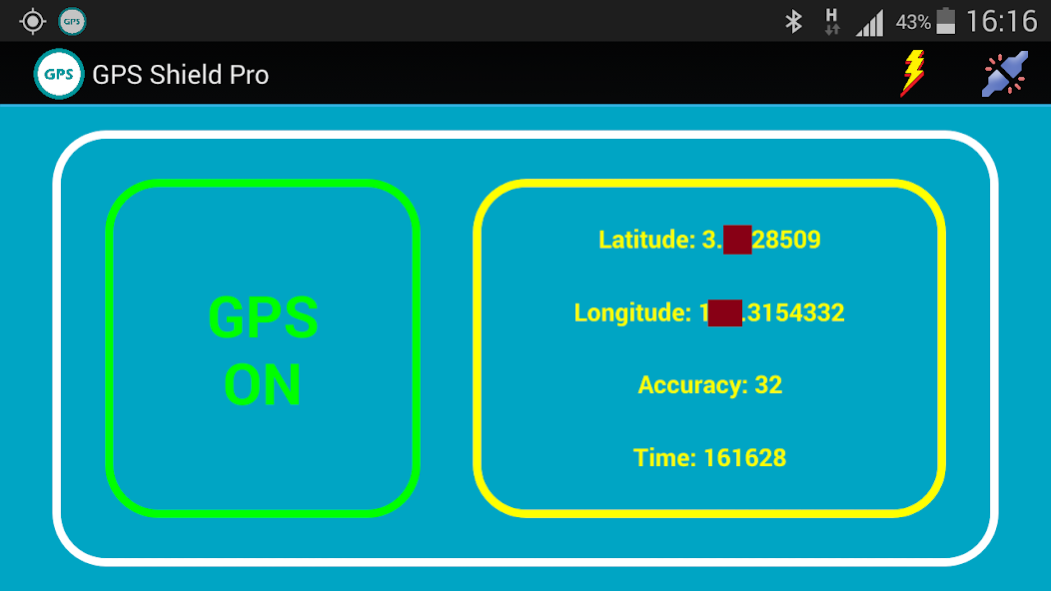
This app provides you a GPS solution by acquiring the GPS signal and outputs the obtained coordinates through a string format via Bluetooth connection.
The output string can be sent to your Arduino board through Bluetooth connection and can be used to locate the current location of your project.
All you have to do is just connect a Bluetooth module (such as HC-06) to your Arduino board, upload the appropriate GPS string parser (sample is available) and establish Bluetooth connection between your project and this app.
You can view the sent output strings in real time by using the Arduino IDE's Serial Monitor window which consist of latitude, longitude, accuracy and time separated by modifiable serial headers.
Or else just use my Bluetooth Serial Terminal or Bluetooth Serial Monitor app to view the output in handy and mobile way!
Using my Bluetooth Serial Terminal/Monitor app, you can view how the GPS Shield app functions right away in seconds without the need of Arduino board/Blueeoth module at all.
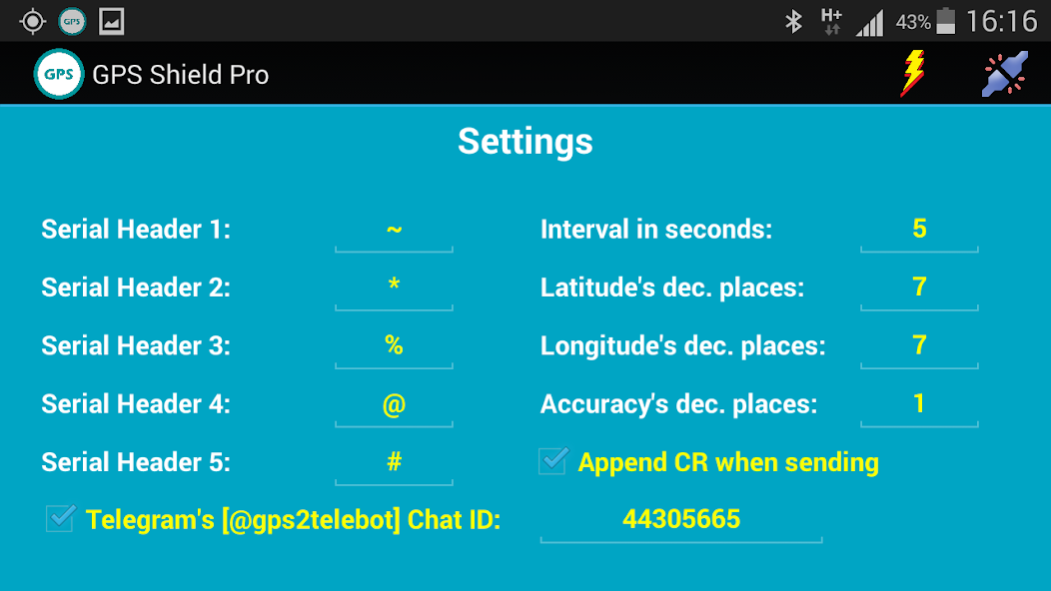
The interval of each output string sending can be set through Settings menu which the minimum value is 5 seconds.
The output string format is:
~Latitude*Longitude%Accuracy@Time#
The output format is tailored to be easily read by everyone (including Arduino of course).
For example: ~3.1276*103.8624%6.2@173405#
The decimal places for latitude, longitude and accuracy can be set to any value you like (through Settings menu) and the format for time is as "HHmmss".
You can change the serial headers to any character you prefer such as from "~" to "A", "*" to "T" and so on, but make sure you make change in the Arduino's serial parser code as well.
If you need the Arduino serial parser code to decode the output string of this app, please don't hesitate to email me at nudge.me959@gmail.com.
Update: Now you can send the coordinates along some information of your location to Telegram app. Open your Telegram Messenger app, search for "gps2telebot" then Click "START" after selecting the bot. Request your Chat ID from the bot by typing "/myid" and use the Chat ID in this GPS Shield Pro app to receive your current location. Any question please ask me through email.
Thank you!
About GPS Shield Pro
The company that develops GPS Shield Pro is NUDGE ME. The latest version released by its developer is 1.0 .
To install GPS Shield Pro on your Android device, just click the green Continue To App button above to start the installation process. The app is listed on our website since 2017-11-27 and was downloaded 0 times. We have already checked if the download link is safe, however for your own protection we recommend that you scan the downloaded app with your antivirus. Your antivirus may detect the GPS Shield Pro as malware as malware if the download link to com.nudge.me.GPSP is broken.
How to install GPS Shield Pro on your Android device:
- Click on the Continue To App button on our website. This will redirect you to Google Play.
- Once the GPS Shield Pro is shown in the Google Play listing of your Android device, you can start its download and installation. Tap on the Install button located below the search bar and to the right of the app icon.
- A pop-up window with the permissions required by GPS Shield Pro will be shown. Click on Accept to continue the process.
- GPS Shield Pro will be downloaded onto your device, displaying a progress. Once the download completes, the installation will start and you'll get a notification after the installation is finished.
Program Details
System requirements
Download information
Pricing
Version History
version
posted on 2017-11-28
* Sending interval is now reduced to 1 second (from 5 seconds in the previous versions).
* App is set to listen for incoming Bluetooth connection.
* Telegram failure toast messages fixed.
* Other minor changes.
Previous added features:
* App now can work during the screen is off - reduces battery consumption.
* There will be notification service when the app is active - easy to re-access when it is running in background.
version
posted on 2016-02-03
Disclaimer
Official Google Play Link
We do not host GPS Shield Pro on our servers. We did not scan it for viruses, adware, spyware or other type of malware. This app is hosted by Google and passed their terms and conditions to be listed there. We recommend caution when installing it.
The Google Play link for GPS Shield Pro is provided to you by apps112.com without any warranties, representations or guarantees of any kind, so access it at your own risk.
If you have questions regarding this particular app contact the publisher directly. For questions about the functionalities of apps112.com contact us.
